
Entering Jobs into the Database
| Team CRS:The HubSpot + ContentsPal integration is now fully completed across the CRS network. Thank you for your patience and feedback as we worked through the rollout.A few important updates: Job Name is back to being a custom field. You can once again name the job however you prefer so your team can utilize it in the way that works best for your operation. The Job Identifier (Job ID) will now appear on the Job Board and within the job record in HubSpot. It is also found in the setting screen inside ContentsPal. |
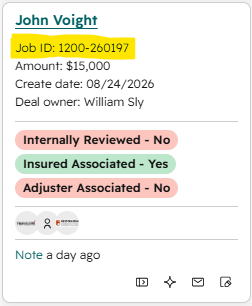
| The Job ID should be used as the consistent identifier for tracking jobs across your systems. Over time, this will also help with accounting items like supplements, partial payments, and other situations where consistent job tracking becomes especially important. SIDE NOTE: We are also working with ContentsPal to make the Job ID visible on additional preview screens. IMPORTANT: Going forward, all new jobs must be created in ContentsPal first. When a job is created in ContentsPal, it will automatically populate in HubSpot and the sync between the two systems will begin. If a job is created directly in HubSpot, that automation will not be connected.Please make sure everyone on your team understands this process: Start the job in ContentsPal → Manage and track it across both systems.This is an important step in reducing duplicate entry, eliminating unnecessary work, and creating a cleaner process across the network.Thank you again for the feedback and support as we continue improving these systems. |